Timesheet Template for Excel
Track employee hours and work time with this free Excel timesheet template. Log daily hours, calculate overtime, and generate weekly summaries. Download Excel and CSV. No signup required.
Free
No signup
Excel, CSV
Business
2026-06-17
What Is This Timesheet Template?
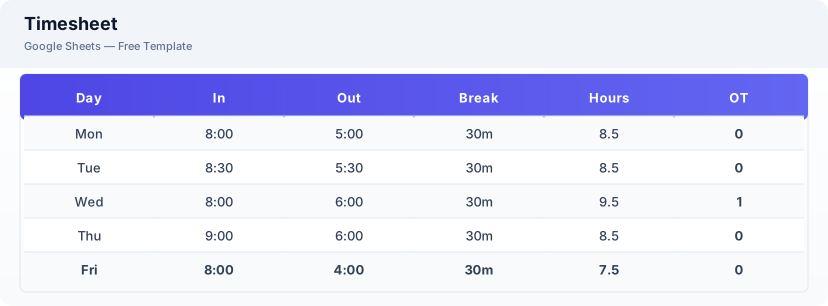
This timesheet template is a free Excel spreadsheet for tracking employee work hours, calculating overtime, and generating weekly summaries. It includes daily clock-in/clock-out logging, automatic regular and overtime calculation, and a weekly summary for payroll processing.
Why Use a Google Sheets Timesheet Template?
A Excel timesheet is the simplest way to track work hours without paying for time tracking software. It works on any device, can be shared with team members for self-reporting, and exports directly to CSV for payroll system import.
When Should You Use This Timesheet Template?
Use this template when you need to track employee hours for payroll, monitor project time allocation, or manage freelance billing. It works for small businesses, remote teams, and any organization that needs a straightforward time tracking solution.
What's Included
- ✓Employee name & department
- ✓Date & day of week
- ✓Clock in / clock out
- ✓Break time
- ✓Regular hours
- ✓Overtime hours
- ✓Daily total
- ✓Weekly summary
How to Use This Template
Who This Template Is For
Available Formats
Excel (.xlsx) — Download the file and open it in Microsoft Excel, Apple Numbers, or any compatible spreadsheet application.
CSV — Download the comma-separated values file for use in data applications, databases, or legacy spreadsheet software.
Customization Tips
- 💡Create a separate sheet tab for each employee to keep timesheets organized.
- 💡Add a notes column for recording project codes or task descriptions alongside hours.
- 💡Use data validation to ensure clock-in and clock-out times are in the correct format.
Use Cases
- Employee time tracking
- Payroll hour calculation
- Project time logging
Download or Copy
Frequently Asked Questions
Related Templates
Last updated: 2026-06-17