Project Management Template for Excel
Manage projects from start to finish with this free Excel project management template. Track tasks, milestones, deadlines, and team progress. No signup required.
Free
No signup
Excel, CSV
Productivity
2026-06-17
What Is This Project Management Template?
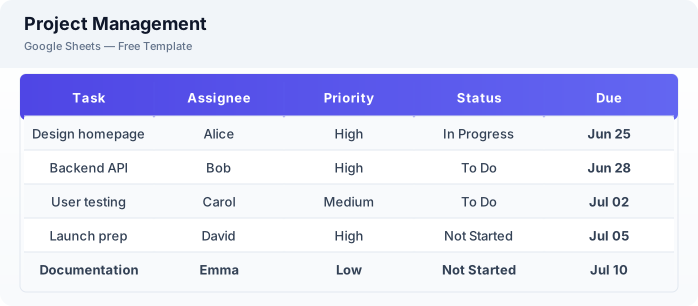
This project management template is a free Excel spreadsheet for tracking projects, tasks, milestones, and team progress. It includes task lists with assignees and priorities, milestone tracking, progress percentage calculation, and a timeline overview to keep your projects on schedule.
Why Use a Google Sheets Project Management Template?
A Excel project management template gives you a lightweight alternative to complex tools like Asana or Jira. You can start tracking immediately without onboarding your team onto new software. It works on any device, supports real-time collaboration, and can be exported for client reporting.
When Should You Use This Project Management Template?
Use this template when you need a simple but structured way to manage projects — whether for client work, internal initiatives, or personal projects. It works well for small to medium teams, freelancers managing multiple clients, and anyone who wants visibility into task progress without paying for premium project management software.
What's Included
- ✓Project name & status
- ✓Task list with assignees
- ✓Start date & due date
- ✓Priority & status tracking
- ✓Milestone tracking
- ✓Progress percentage
- ✓Team member overview
- ✓Project timeline
How to Use This Template
Who This Template Is For
Available Formats
Excel (.xlsx) — Download the file and open it in Microsoft Excel, Apple Numbers, or any compatible spreadsheet application.
CSV — Download the comma-separated values file for use in data applications, databases, or legacy spreadsheet software.
Customization Tips
- 💡Color code tasks by priority (red for high, yellow for medium, green for low) for instant visual scanning.
- 💡Create a separate tab for each project phase to keep large projects organized.
- 💡Share the sheet with your team so everyone can update their own task status in real time.
Use Cases
- Team project management
- Task tracking & delegation
- Milestone planning
Download or Copy
Frequently Asked Questions
Related Templates
Last updated: 2026-06-17