Task Tracker Template for Excel
Track tasks and boost team productivity with this free Excel task tracker. Assign tasks, set priorities, monitor deadlines, and track completion status. No signup required.
Free
No signup
Excel, CSV
Productivity
2026-06-17
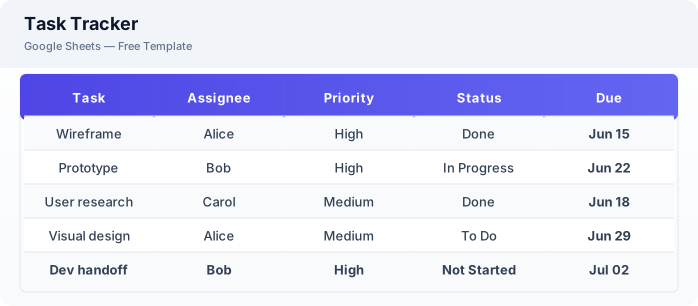
What Is This Task Tracker Template?
This task tracker template is a free Excel spreadsheet for managing tasks across teams or projects. It includes task assignment, priority levels, status tracking, due dates, and category grouping — everything you need to keep work organized without a paid project management tool.
Why Use a Google Sheets Task Tracker Template?
A Excel task tracker is lightweight, free, and accessible from any device. Unlike dedicated task management apps, there is no learning curve, no per-user pricing, and no data lock-in. You can customize fields, share with your team, and start tracking in minutes.
When Should You Use This Task Tracker Template?
Use this template when you need a simple task management system for your team, personal projects, or client work. It works for sprint planning, daily to-do lists, team task delegation, and any scenario where you need to track what needs to be done and by when.
What's Included
- ✓Task name & description
- ✓Assignee
- ✓Priority (High / Medium / Low)
- ✓Status (To Do / In Progress / Done)
- ✓Due date
- ✓Category or project
- ✓Completion date
- ✓Notes & attachments
How to Use This Template
Who This Template Is For
Available Formats
Excel (.xlsx) — Download the file and open it in Microsoft Excel, Apple Numbers, or any compatible spreadsheet application.
CSV — Download the comma-separated values file for use in data applications, databases, or legacy spreadsheet software.
Customization Tips
- 💡Use filter views so each team member can see only their own tasks.
- 💡Add conditional formatting to highlight overdue tasks in red.
- 💡Create a separate tab for each sprint or project phase.
Use Cases
- Team task management
- Personal to-do tracking
- Sprint & project task tracking
Download or Copy
Frequently Asked Questions
Related Templates
Last updated: 2026-06-17