CRM Template for Excel
Manage client relationships with this free Excel CRM template. Track leads, contacts, deals, and follow-ups. Perfect for small business sales pipeline management. No signup required.
Free
No signup
Excel, CSV
Business
2026-06-17
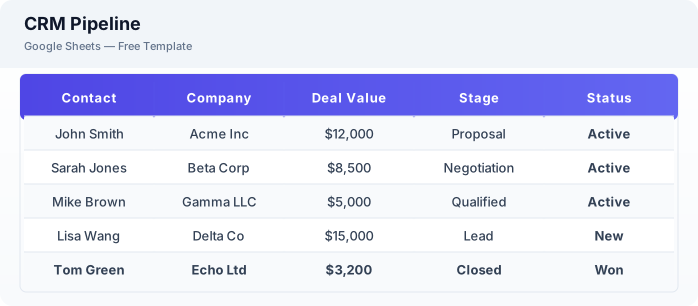
What Is This CRM Template?
This CRM template is a free Excel spreadsheet for managing client relationships, tracking leads through your sales pipeline, and logging customer interactions. It includes contact management, deal tracking, follow-up scheduling, and interaction history — everything a small business needs to stay on top of sales.
Why Use a Google Sheets CRM Template?
A Excel CRM gives you the core functionality of expensive CRM software at zero cost. You can track leads, manage deals, and log interactions without onboarding your team onto complex systems. It is accessible from any device and supports real-time collaboration.
When Should You Use This CRM Template?
Use this template when you need a simple system to track leads, manage client relationships, and monitor your sales pipeline. It works for small businesses, real estate agents, freelancers, and any professional who needs to stay organized with client follow-ups.
What's Included
- ✓Contact name & company
- ✓Email & phone
- ✓Lead source
- ✓Deal value & stage
- ✓Follow-up date
- ✓Status (New / Contacted / Won / Lost)
- ✓Interaction history log
- ✓Notes & tags
How to Use This Template
Who This Template Is For
Available Formats
Excel (.xlsx) — Download the file and open it in Microsoft Excel, Apple Numbers, or any compatible spreadsheet application.
CSV — Download the comma-separated values file for use in data applications, databases, or legacy spreadsheet software.
Customization Tips
- 💡Create separate sheet tabs for hot leads, current clients, and past clients.
- 💡Use conditional formatting to highlight follow-ups due this week.
- 💡Add a dashboard tab with summary charts to visualize pipeline health at a glance.
Use Cases
- Small business CRM
- Sales pipeline tracking
- Lead & contact management
Download or Copy
Frequently Asked Questions
Related Templates
Last updated: 2026-06-17