Invoice Template for Excel
Send professional invoices with this free Excel invoice template. No signup required — copy the template or download Excel and CSV files. Track invoice numbers, client info, line items, tax, and payment status.
Free
No signup
Excel, CSV
Business
2026-06-01
What Is This Invoice Template?
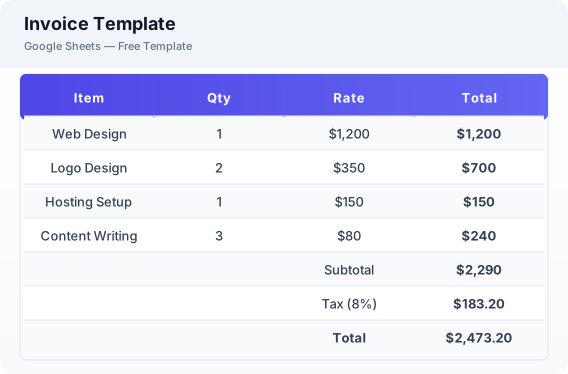
This invoice template is a free Excel spreadsheet for freelancers, contractors, and small business owners who need a simple way to create invoices, calculate totals, and track payment status. It includes fields for invoice number, client details, line items with quantities and rates, automatic subtotal and tax calculation, and a payment status tracker.
Why Use a Google Sheets Invoice Template?
A Excel invoice template is easy to copy, customize, share, and update without installing accounting software. It works well for simple billing workflows and can also be exported to Excel or CSV for offline records. Since it lives in Excel, you can access it from any device and share individual invoices with clients via a link.
When Should You Use This Invoice Template?
Use this template when you need a lightweight invoice format for one-time projects, recurring client work, contractor billing, or simple payment tracking. It is suitable for freelancers, consultants, designers, developers, and other service providers who do not need a full accounting system.
What's Included
- ✓Invoice number & date
- ✓Due date & payment terms
- ✓Client name & contact
- ✓Line items with description
- ✓Quantity & rate
- ✓Subtotal & tax
- ✓Total amount
- ✓Payment status tracker
How to Use This Template
Who This Template Is For
Available Formats
Excel (.xlsx) — Download the file and open it in Microsoft Excel, Apple Numbers, or any compatible spreadsheet application.
CSV — Download the comma-separated values file for use in data applications, databases, or legacy spreadsheet software.
Customization Tips
- 💡Insert your company logo in the header area after copying to Excel for a branded invoice look.
- 💡Create a separate sheet tab for each client to keep invoices organized by customer.
- 💡Use the payment status column to filter pending invoices and follow up on overdue payments.
Use Cases
- Freelance invoicing
- Small business billing
- Contractor payment tracking
Download or Copy
Frequently Asked Questions
Related Templates
Last updated: 2026-06-01