Expense Tracker Template for Excel
Track every expense with this free Excel expense tracker. Log daily spending, categorize transactions, and review monthly summaries. Download Excel and CSV versions. No signup required.
Free
No signup
Excel, CSV
Finance
2026-06-01
What Is This Expense Tracker Template?
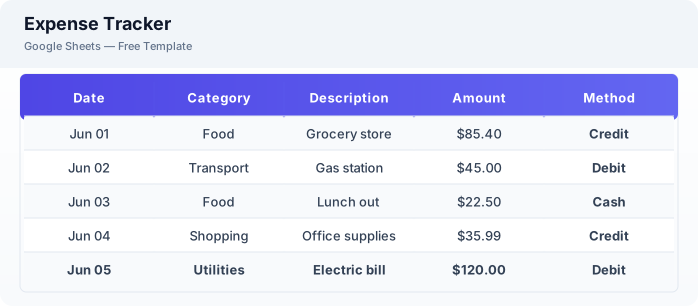
This expense tracker is a free Excel spreadsheet for logging daily expenses, categorizing transactions by type, and reviewing monthly spending summaries. It helps you understand where your money goes with a simple transaction log format.
Why Use a Google Sheets Expense Tracker Template?
An expense tracker in Excel is lightweight and accessible from any device. Unlike budgeting apps, it gives you complete control over categories and data, with no ads or subscription fees.
When Should You Use This Expense Tracker Template?
Use this template when you want to understand your daily spending habits. It works well alongside a budget planner — use the planner for goals and this tracker for actual transaction logging.
What's Included
- ✓Date & transaction log
- ✓Category (Food, Transport, Housing, etc.)
- ✓Payment method
- ✓Amount
- ✓Notes
- ✓Monthly category summary
- ✓Daily running total
How to Use This Template
Who This Template Is For
Available Formats
Excel (.xlsx) — Download the file and open it in Microsoft Excel, Apple Numbers, or any compatible spreadsheet application.
CSV — Download the comma-separated values file for use in data applications, databases, or legacy spreadsheet software.
Customization Tips
- 💡Customize category dropdowns to match your actual spending patterns (add Delivery, Pets, or Subscriptions).
- 💡Use the notes field to mark tax-deductible expenses for easier tax preparation.
- 💡Review the monthly category summary at month-end to adjust your budget for the next month.
Use Cases
- Daily expense logging
- Personal spending tracking
- Expense categorization & analysis
Download or Copy
Frequently Asked Questions
Related Templates
Last updated: 2026-06-01