Contractor Invoice Template for Excel
Create professional contractor invoices with this free Excel template. Track project milestones, retainers, change orders, and expenses. No signup required.
Free
No signup
Excel, CSV
Business
2026-06-01
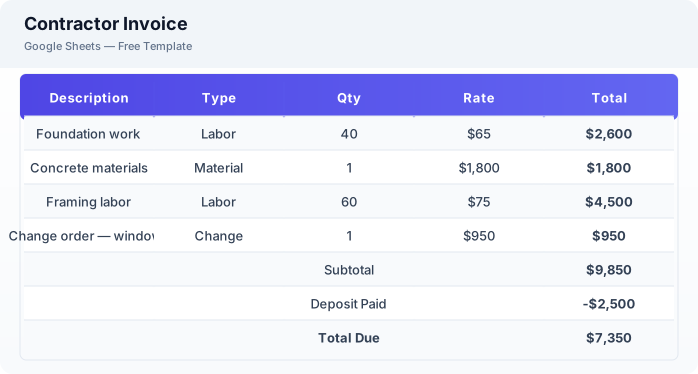
What Is This Contractor Invoice Template?
This contractor invoice template is a free Excel spreadsheet designed for contractors, subcontractors, and tradespeople who need to invoice for projects with multiple cost components including labor, materials, change orders, and retainers.
Why Use a Google Sheets Contractor Invoice Template?
A contractor invoice template in Excel handles the complexity of construction billing with dedicated sections for milestones, change orders, and retainers — items that standard invoice templates often miss.
When Should You Use This Contractor Invoice Template?
Use this template when you need to invoice for construction projects, renovation work, or any contractor service where costs include labor, materials, retainers, and potential change orders.
What's Included
- ✓Invoice ID & project name
- ✓Contractor & client details
- ✓Project milestone tracking
- ✓Labor hours & rate
- ✓Material costs
- ✓Change orders
- ✓Retainer & deposit tracking
- ✓Subtotal & tax
- ✓Total due
How to Use This Template
Who This Template Is For
Available Formats
Excel (.xlsx) — Download the file and open it in Microsoft Excel, Apple Numbers, or any compatible spreadsheet application.
CSV — Download the comma-separated values file for use in data applications, databases, or legacy spreadsheet software.
Customization Tips
- 💡Create a saved template with your contractor license number and insurance details pre-filled.
- 💡Track change orders separately from the original contract to avoid billing disputes.
- 💡Use the retainer section to show clients their deposit status and remaining balance.
Use Cases
- Contractor project billing
- Construction milestone invoicing
- Subcontractor payment tracking
Download or Copy
Frequently Asked Questions
Related Templates
Last updated: 2026-06-01