Freelance Invoice Template for Excel
Create clean, professional invoices for your freelance business with this free Excel template. No signup required — download. Track hourly rates, project fees, expenses, and payments.
Free
No signup
Excel, CSV
Business
2026-06-01
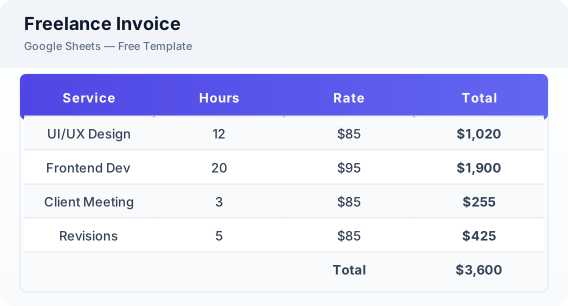
What Is This Freelance Invoice Template?
This freelance invoice template is a free Excel spreadsheet designed specifically for self-employed professionals, freelancers, and independent contractors. It supports both hourly billing and fixed project fees, tracks reimbursable expenses, calculates tax automatically, and includes a payment status tracker.
Why Use a Google Sheets Freelance Invoice Template?
A freelance invoice template in Excel saves time by automating calculations and providing a professional invoice format without recurring subscription fees. You can customize it with your branding, reuse it for multiple clients, and export invoices as PDF, Excel, or CSV for your records.
When Should You Use This Freelance Invoice Template?
Use this template when you need to send invoices for freelance projects, consulting engagements, or contract work. It works for designers, developers, writers, photographers, consultants, and any independent professional who bills clients on a project or hourly basis.
What's Included
- ✓Invoice ID & date
- ✓Payment due date
- ✓Your business details
- ✓Client details
- ✓Service description
- ✓Hourly rate & hours
- ✓Fixed project fees
- ✓Expense reimbursement
- ✓Subtotal & tax
- ✓Total due
- ✓Payment status
How to Use This Template
Who This Template Is For
Available Formats
Excel (.xlsx) — Download the file and open it in Microsoft Excel, Apple Numbers, or any compatible spreadsheet application.
CSV — Download the comma-separated values file for use in data applications, databases, or legacy spreadsheet software.
Customization Tips
- 💡Create a saved template sheet with your business details pre-filled so you can duplicate it for each new client.
- 💡Track reimbursable expenses separately from service fees to show clients exactly what they are paying for.
- 💡Use the notes field to record payment terms like net-15 or net-30 for each invoice.
Use Cases
- Freelance billing
- Self-employed invoicing
- Independent contractor payments
Download or Copy
Frequently Asked Questions
Related Templates
Last updated: 2026-06-01