Stock Portfolio Tracker for Excel
Track your stock portfolio with this free Excel template. No signup required — download for Excel or download Excel and CSV. Monitor tickers, shares, cost basis, market value, gain/loss, and dividends.
Free
No signup
Excel, CSV
Finance
2026-06-01
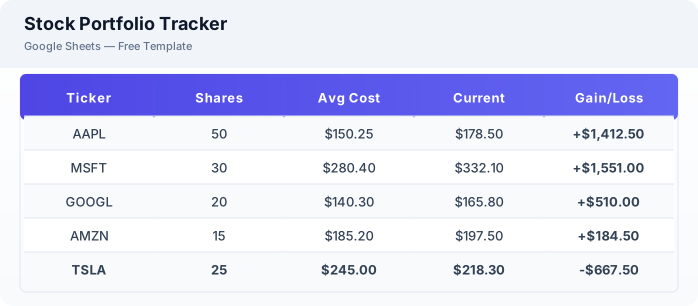
What Is This Stock Portfolio Template?
This stock portfolio tracker is a free Excel spreadsheet designed to help individual investors monitor their stock holdings. It tracks tickers, shares, average cost per share, cost basis, current market value, unrealized gain or loss, and dividend payments. The template is suitable for both long-term investors and active traders who want a clear snapshot of their portfolio performance.
Why Use a Google Sheets Stock Portfolio Template?
A Excel portfolio tracker gives you full control over your data without tying you to a specific brokerage or paid service. You can customize sectors, add notes, and use GOOGLEFINANCE formulas for live price updates. The same template can be downloaded as Excel or CSV for offline use or tax reporting.
When Should You Use This Stock Portfolio Template?
Use this template when you hold stocks across multiple brokerages and want a unified view of your portfolio. It works well for tracking cost basis, monitoring gain or loss, and logging dividend income. If you focus on dividends, also check the dedicated dividend tracker template.
What's Included
- ✓Ticker symbol
- ✓Company name
- ✓Market & sector
- ✓Shares owned
- ✓Average cost per share
- ✓Current price
- ✓Cost basis
- ✓Market value
- ✓Gain / loss (absolute & %)
- ✓Dividend tracking
- ✓Notes
How to Use This Template
Who This Template Is For
Available Formats
Excel (.xlsx) — Download the file and open it in Microsoft Excel, Apple Numbers, or any compatible spreadsheet application.
CSV — Download the comma-separated values file for use in data applications, databases, or legacy spreadsheet software.
Customization Tips
- 💡Use GOOGLEFINANCE formulas in the Current Price column to auto-update stock prices in Excel.
- 💡Add a separate tab for each portfolio (Retirement, Trading, Crypto) to keep strategies distinct.
- 💡Export to CSV at month-end for tax reporting — the cost basis and gain/loss columns are audit-ready.
Use Cases
- Personal investment tracking
- Stock portfolio monitoring
- Dividend income tracking
Download or Copy
Frequently Asked Questions
Related Templates
Last updated: 2026-06-01