Weekly Budget Template for Excel
Use this free weekly budget template to track income, expenses, savings, and weekly balance in Excel. No signup required — copy the Excel version or download Excel and CSV files for free.
Free
No signup
Excel, CSV
Finance
2026-06-01
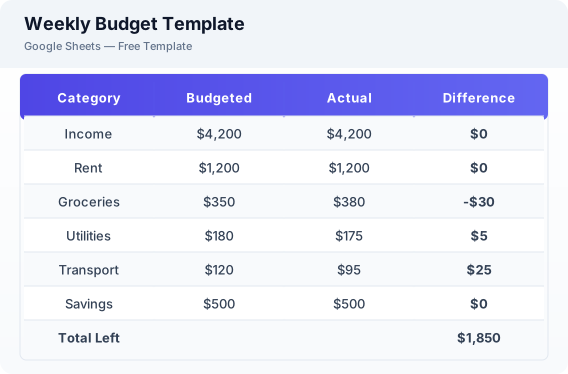
What Is This Weekly Budget Template?
This weekly budget template is a free Excel spreadsheet designed for tracking income, fixed and variable expenses, savings, and weekly balance. It includes pre-labeled sections for each spending category and automatically calculates your remaining balance. The template also supports Excel and CSV formats for users who prefer offline or desktop workflows.
Why Use a Google Sheets Weekly Budget Template?
A Excel weekly budget template is easy to copy, customize, and reuse without downloading accounting software. You can access it from any device, share it with family members, and update it in real time. The built-in formulas handle calculations automatically, so you do not need to be a spreadsheet expert to track your weekly finances.
When Should You Use This Weekly Budget Template?
Use this template when you want a clear weekly overview of your income and expenses. It works well for personal budgeting, household expense tracking, freelance income management, and student allowance planning. If you prefer tracking monthly instead, check the related monthly budget template.
What's Included
- ✓Weekly income
- ✓Fixed expenses
- ✓Variable expenses
- ✓Savings contribution
- ✓Weekly balance
- ✓Category summary
- ✓Spending notes
How to Use This Template
Who This Template Is For
Available Formats
Excel (.xlsx) — Download the file and open it in Microsoft Excel, Apple Numbers, or any compatible spreadsheet application.
CSV — Download the comma-separated values file for use in data applications, databases, or legacy spreadsheet software.
Customization Tips
- 💡Add extra rows for one-time expenses like gifts or car repairs without breaking the layout.
- 💡Duplicate the sheet tab to track multiple weeks side by side for comparison.
- 💡Use the notes column to mark recurring expenses vs. one-off purchases for better budgeting next week.
Use Cases
- Personal weekly budgeting
- Weekly expense tracking
- Household budget planning
Download or Copy
Frequently Asked Questions
Related Templates
Last updated: 2026-06-01