Budget Planner Template for Excel
Plan and manage your monthly finances with this free budget planner for Excel. No signup required — download. Track income, fixed and variable expenses, savings goals, and net balance.
Free
No signup
Excel, CSV
Finance
2026-06-01
What Is This Budget Planner Template?
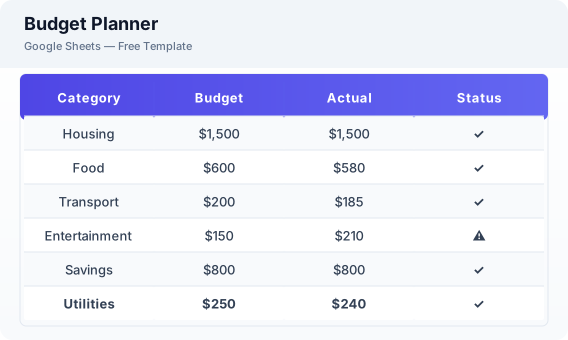
This budget planner template is a free Excel spreadsheet for individuals and couples who want to manage their monthly finances. It includes sections for income sources, fixed and variable expenses, savings goals, debt repayment tracking, and a budget vs actual comparison to help you understand where your money goes.
Why Use a Google Sheets Budget Planner Template?
A Excel budget planner gives you a clear picture of your monthly cash flow without requiring a paid app or bank connection. You can customize categories, track multiple income streams, and see how your actual spending compares to your budget. The template works on any device and can be downloaded as Excel or CSV.
When Should You Use This Budget Planner Template?
Use this template at the start of each month to plan your spending and savings. It works well for personal budgeting, household finance management, and savings goal tracking. If you prefer a weekly breakdown, check the weekly budget template instead.
What's Included
- ✓Monthly income sources
- ✓Fixed expenses (rent, utilities, insurance)
- ✓Variable expenses (groceries, dining, shopping)
- ✓Savings goals
- ✓Debt repayment tracking
- ✓Net cash flow
- ✓Budget vs actual comparison
How to Use This Template
Who This Template Is For
Available Formats
Excel (.xlsx) — Download the file and open it in Microsoft Excel, Apple Numbers, or any compatible spreadsheet application.
CSV — Download the comma-separated values file for use in data applications, databases, or legacy spreadsheet software.
Customization Tips
- 💡Set up conditional formatting to highlight categories where actual spending exceeds budget (red) or stays under (green).
- 💡Review the budget vs actual comparison at month-end to identify which categories need adjustment.
- 💡Use separate sheet tabs for each month to build a full-year financial overview.
Use Cases
- Monthly budget planning
- Personal finance management
- Savings goal tracking
Download or Copy
Frequently Asked Questions
Related Templates
Last updated: 2026-06-01