Budget Tracker Template for Excel
Track your spending and stay on budget with this free Excel budget tracker. Monitor daily expenses, category limits, and monthly summaries. Download Excel and CSV. No signup required.
Free
No signup
Excel, CSV
Finance
2026-06-19
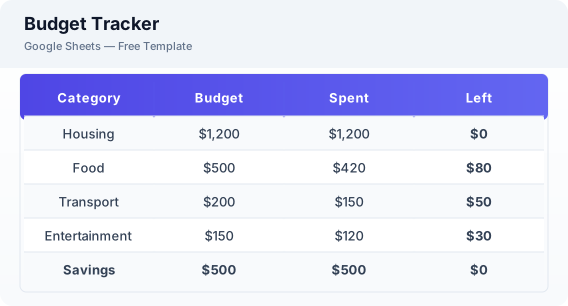
What Is This Budget Tracker Template?
This budget tracker template is a free Excel spreadsheet for monitoring daily spending against your budget limits. It combines expense logging with category budget tracking, giving you real-time visibility into where your money goes each month.
Why Use a Google Sheets Budget Tracker Template?
A budget tracker helps you stay accountable to your spending plan. Unlike a budget planner that you set at the beginning of the month, a tracker is something you use daily to log expenses and check your remaining balances.
When Should You Use This Budget Tracker Template?
Use this template alongside the budget planner — use the planner to set your monthly budget, and use this tracker to log daily spending and monitor progress throughout the month.
What's Included
- ✓Monthly income
- ✓Category budget limits
- ✓Daily expense log
- ✓Running total by category
- ✓Budget vs actual comparison
- ✓Remaining balance
- ✓Monthly summary
How to Use This Template
Who This Template Is For
Available Formats
Excel (.xlsx) — Download the file and open it in Microsoft Excel, Apple Numbers, or any compatible spreadsheet application.
CSV — Download the comma-separated values file for use in data applications, databases, or legacy spreadsheet software.
Customization Tips
- 💡Check your budget tracker daily to stay aware of your spending.
- 💡Adjust category limits each month based on actual spending patterns.
- 💡Set up alerts by using conditional formatting when a category reaches 80% of its limit.
Use Cases
- Daily budget tracking
- Category spending limits
- Month-end budget review
Download or Copy
Frequently Asked Questions
Related Templates
Last updated: 2026-06-19