Bill Tracker Template for Excel
Never miss a payment with this free Excel bill tracker. Track due dates, amounts, payment status, and recurring bills all in one place. Download Excel and CSV. No signup required.
Free
No signup
Excel, CSV
Finance
2026-06-17
What Is This Bill Tracker Template?
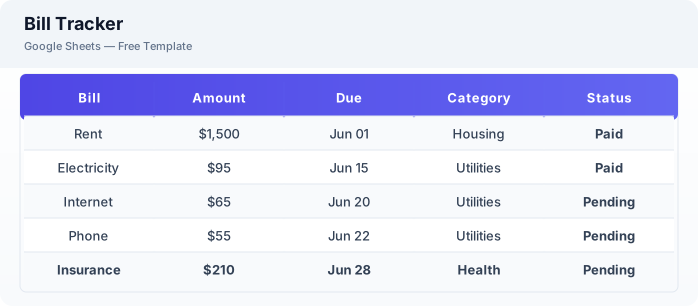
This bill tracker template is a free Excel spreadsheet for managing all your bills in one place. Track due dates, amounts, payment status, and recurring schedules to ensure you never miss a payment. The template helps you stay organized and avoid late fees.
Why Use a Google Sheets Bill Tracker Template?
A Excel bill tracker gives you a complete view of your monthly obligations without paid budgeting apps. You can see all bills at a glance, track what is paid and what is due, and plan your spending around fixed expenses.
When Should You Use This Bill Tracker Template?
Use this template when you want to consolidate all your bills into a single view, track payment due dates, or get a better understanding of your fixed monthly expenses. It works alongside the budget planner — use the planner for goals and this tracker for fixed bills.
What's Included
- ✓Bill name & category
- ✓Amount due
- ✓Due date
- ✓Payment status
- ✓Date paid
- ✓Recurring monthly / annual
- ✓Auto-pay enabled
- ✓Notes
How to Use This Template
Who This Template Is For
Available Formats
Excel (.xlsx) — Download the file and open it in Microsoft Excel, Apple Numbers, or any compatible spreadsheet application.
CSV — Download the comma-separated values file for use in data applications, databases, or legacy spreadsheet software.
Customization Tips
- 💡Sort bills by due date to always know what is coming up first.
- 💡Use conditional formatting to highlight overdue bills in red automatically.
- 💡Add a yearly summary tab to track how much you spend on bills annually.
Use Cases
- Monthly bill tracking
- Recurring payment management
- Due date monitoring
Download or Copy
Frequently Asked Questions
Related Templates
Last updated: 2026-06-17