Savings Tracker Template for Excel
Reach your savings goals with this free Excel savings tracker. Track multiple goals, monitor progress, and see your savings grow over time. Download Excel and CSV. No signup required.
Free
No signup
Excel, CSV
Finance
2026-06-17
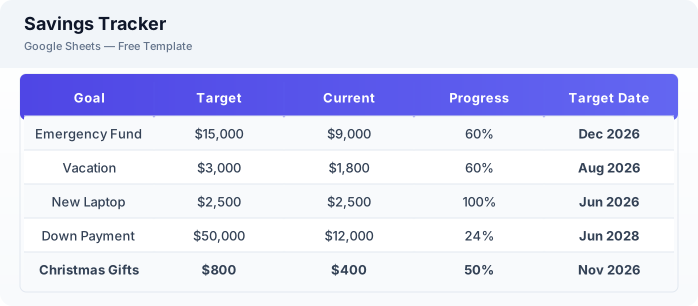
What Is This Savings Tracker Template?
This savings tracker template is a free Excel spreadsheet for setting and tracking multiple savings goals. Whether you are building an emergency fund, saving for a vacation, or planning a large purchase, this template helps you monitor progress and stay motivated.
Why Use a Google Sheets Savings Tracker Template?
A Excel savings tracker keeps your financial goals visible and measurable. Unlike savings accounts that only show a balance, this template shows progress toward specific targets, projected completion dates, and how your savings grow over time.
When Should You Use This Savings Tracker Template?
Use this template when you want to save for specific goals — emergency fund, down payment, vacation, new car, or any financial target. Pair it with the budget planner to allocate monthly savings contributions and the debt payoff template if you are also paying down debt.
What's Included
- ✓Savings goal name
- ✓Target amount
- ✓Current amount
- ✓Progress percentage
- ✓Monthly contribution
- ✓Target date
- ✓Projected completion date
- ✓Notes
How to Use This Template
Who This Template Is For
Available Formats
Excel (.xlsx) — Download the file and open it in Microsoft Excel, Apple Numbers, or any compatible spreadsheet application.
CSV — Download the comma-separated values file for use in data applications, databases, or legacy spreadsheet software.
Customization Tips
- 💡Create separate tabs for short-term, medium-term, and long-term savings goals.
- 💡Use the progress percentage column to stay motivated — color code above 50% green.
- 💡Automate your monthly contribution by setting up recurring transfers from checking to savings.
Use Cases
- Savings goal tracking
- Emergency fund building
- Large purchase planning
Download or Copy
Frequently Asked Questions
Related Templates
Last updated: 2026-06-17