Purchase Order Template for Excel
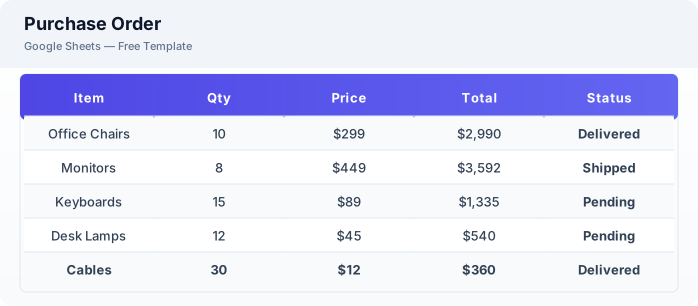
Create professional purchase orders with this free Excel purchase order template. Track vendor orders, quantities, prices, and delivery status. Download Excel and CSV. No signup required.
Free
No signup
Excel, CSV
Business
2026-06-17
What Is This Purchase Order Template?
This purchase order template is a free Excel spreadsheet for creating and tracking purchase orders. It includes vendor management, line item tracking, automatic totals, and delivery status monitoring.
Why Use a Google Sheets Purchase Order Template?
A purchase order template helps you manage procurement professionally without purchasing order management software. You can track what was ordered, from whom, at what price, and whether it has been delivered.
When Should You Use This Purchase Order Template?
Use this template when ordering supplies, materials, or services from vendors. It works alongside the inventory template to track received items and the invoice tracker for matching purchase orders with invoices.
What's Included
- ✓PO number & date
- ✓Vendor name & contact
- ✓Item description
- ✓Quantity & unit price
- ✓Total line amount
- ✓Order status
- ✓Delivery date
- ✓Payment terms
How to Use This Template
Who This Template Is For
Available Formats
Excel (.xlsx) — Download the file and open it in Microsoft Excel, Apple Numbers, or any compatible spreadsheet application.
CSV — Download the comma-separated values file for use in data applications, databases, or legacy spreadsheet software.
Customization Tips
- 💡Create a reference tab with your approved vendor list and contact details.
- 💡Use sequential PO numbers to keep orders organized and traceable.
- 💡Share the sheet with your procurement team for collaborative order management.
Use Cases
- Vendor purchase order management
- Procurement tracking
- Inventory ordering
Download or Copy
Frequently Asked Questions
Related Templates
Last updated: 2026-06-17