Employee Schedule Template for Excel
Create and manage staff schedules with this free Excel employee schedule template. Plan shifts, track coverage, and manage time-off requests. Download Excel and CSV. No signup required.
Free
No signup
Excel, CSV
Business
2026-06-17
What Is This Employee Schedule Template?
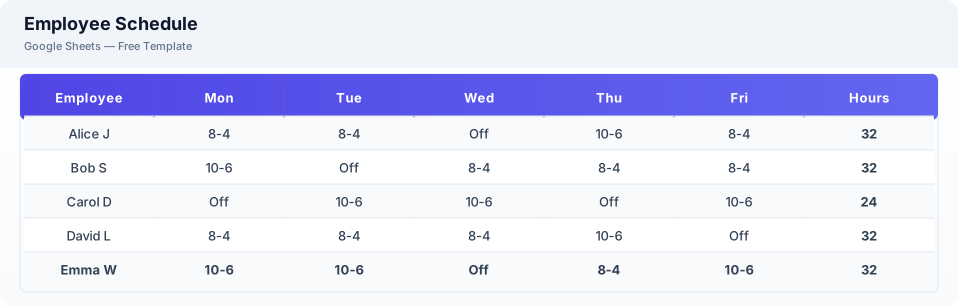
This employee schedule template is a free Excel spreadsheet for creating weekly staff schedules, tracking shifts, and managing time-off requests. It provides a clear view of who is working when and ensures proper coverage.
Why Use a Google Sheets Employee Schedule Template?
A Excel employee schedule simplifies shift planning without scheduling software. You can see coverage at a glance, track hours, and share the schedule with your team instantly.
When Should You Use This Employee Schedule Template?
Use this template when you need to schedule staff shifts, manage team availability, or plan weekly coverage. It works alongside the timesheet template for tracking actual hours worked against scheduled hours.
What's Included
- ✓Employee name & role
- ✓Monday — Sunday shift columns
- ✓Shift times
- ✓Total weekly hours
- ✓Time-off requests
- ✓Coverage notes
- ✓Week commencing date
How to Use This Template
Who This Template Is For
Available Formats
Excel (.xlsx) — Download the file and open it in Microsoft Excel, Apple Numbers, or any compatible spreadsheet application.
CSV — Download the comma-separated values file for use in data applications, databases, or legacy spreadsheet software.
Customization Tips
- 💡Create separate tabs for different departments or teams.
- 💡Use conditional formatting to highlight overlapping shifts or double-bookings.
- 💡Publish the schedule by sharing the Excel link with your team.
Use Cases
- Employee shift scheduling
- Staff coverage planning
- Time-off management
Download or Copy
Frequently Asked Questions
Related Templates
Last updated: 2026-06-17