Project Budget Template for Excel
Keep your projects on budget with this free Excel project budget template. Track estimated vs actual costs, monitor spending, and manage expenses. Download Excel and CSV. No signup required.
Free
No signup
Excel, CSV
Finance
2026-06-17
What Is This Project Budget Template?
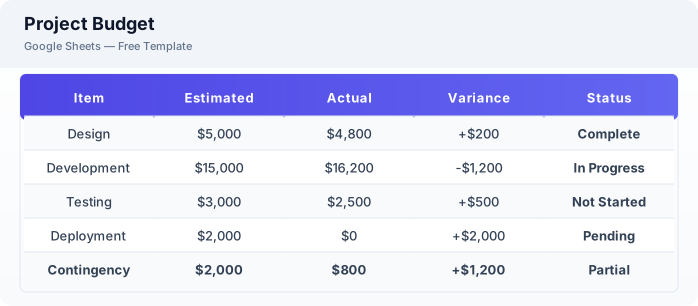
This project budget template is a free Excel spreadsheet for tracking project costs against your budget. It compares estimated vs actual spending, calculates variances, and helps you keep projects financially on track.
Why Use a Google Sheets Project Budget Template?
A project budget template helps you avoid cost overruns by providing real-time visibility into spending. Unlike static budget documents, this template updates automatically as you enter actual costs.
When Should You Use This Project Budget Template?
Use this template at the start of any project with a defined budget. Update it weekly with actual costs to monitor spending. It works alongside the project management template for task tracking and the expense tracker for detailed expense logging.
What's Included
- ✓Budget line item
- ✓Estimated cost
- ✓Actual cost
- ✓Variance
- ✓Percentage spent
- ✓Vendor / payee
- ✓Payment status
- ✓Notes
How to Use This Template
Who This Template Is For
Available Formats
Excel (.xlsx) — Download the file and open it in Microsoft Excel, Apple Numbers, or any compatible spreadsheet application.
CSV — Download the comma-separated values file for use in data applications, databases, or legacy spreadsheet software.
Customization Tips
- 💡Create separate tabs for different budget phases or departments.
- 💡Use conditional formatting to highlight line items exceeding budget in red.
- 💡Share with stakeholders for transparent budget reporting.
Use Cases
- Project cost management
- Budget vs actual tracking
- Expense monitoring
Download or Copy
Frequently Asked Questions
Related Templates
Last updated: 2026-06-17