Personal Finance Tracker for Excel
Manage your complete finances with this free Excel personal finance tracker. Track income, expenses, savings, investments, and net worth in one dashboard. No signup required.
Free
No signup
Excel, CSV
Finance
2026-06-19
What Is This Personal Finance Template?
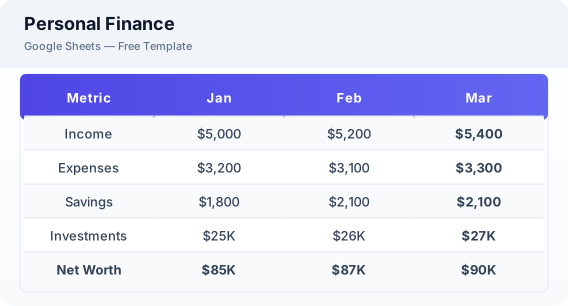
This personal finance tracker template is a free Excel spreadsheet that combines budgeting, expense tracking, savings goals, investment monitoring, and net worth calculation into one comprehensive dashboard. It gives you a complete picture of your financial health at a glance.
Why Use a Google Sheets Personal Finance Template?
A personal finance tracker helps you see the big picture of your financial life. Instead of juggling multiple spreadsheets for budget, savings, and investments, this template brings everything together in one place.
When Should You Use This Personal Finance Template?
Use this template when you want a complete view of your financial life — income, spending, savings, and net worth. Update it monthly to track your financial progress over time.
What's Included
- ✓Income tracking
- ✓Expense categories
- ✓Monthly budget vs actual
- ✓Savings goals
- ✓Investment portfolio snapshot
- ✓Net worth calculation
- ✓Financial dashboard overview
How to Use This Template
Who This Template Is For
Available Formats
Excel (.xlsx) — Download the file and open it in Microsoft Excel, Apple Numbers, or any compatible spreadsheet application.
CSV — Download the comma-separated values file for use in data applications, databases, or legacy spreadsheet software.
Customization Tips
- 💡Update the dashboard on the same day each month for consistent trend data.
- 💡Add all financial accounts — checking, savings, investments, retirement — for a complete picture.
- 💡Review the net worth trend quarterly to ensure you are building wealth over time.
Use Cases
- Personal financial management
- Monthly budget tracking
- Net worth monitoring
Download or Copy
Frequently Asked Questions
Related Templates
Last updated: 2026-06-19