Study Planner Template for Excel
Plan your study sessions and ace your exams with this free Excel study planner. Organize subjects, track study hours, and prepare for exams. Download Excel and CSV. No signup required.
Free
No signup
Excel, CSV
Education
2026-06-17
What Is This Study Planner Template?
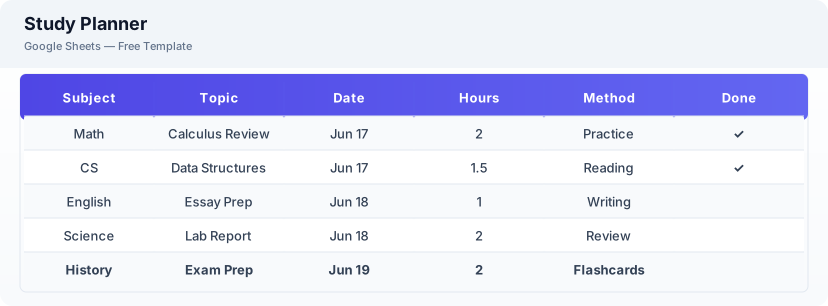
This study planner template is a free Excel spreadsheet for organizing study sessions, tracking preparation progress, and building confidence before exams. It helps you allocate time effectively across subjects and study methods.
Why Use a Google Sheets Study Planner Template?
A study planner helps you prepare systematically instead of cramming. By tracking hours per subject and rating your confidence, you can focus your limited study time where it is most needed.
When Should You Use This Study Planner Template?
Use this template during exam periods, midterms, or any time you need to prepare for assessments. It works alongside the class schedule template for your timetable and the assignment tracker for managing coursework deadlines.
What's Included
- ✓Subject & topic
- ✓Study date & time
- ✓Study duration (hours)
- ✓Study method (reading, practice, review)
- ✓Completed checkbox
- ✓Exam date
- ✓Confidence rating
- ✓Notes & questions
How to Use This Template
Who This Template Is For
Available Formats
Excel (.xlsx) — Download the file and open it in Microsoft Excel, Apple Numbers, or any compatible spreadsheet application.
CSV — Download the comma-separated values file for use in data applications, databases, or legacy spreadsheet software.
Customization Tips
- 💡Use the Pomodoro technique — study in 25-minute focused blocks with 5-minute breaks.
- 💡Prioritize topics you are least confident about based on your confidence rating.
- 💡Create a separate tab for each subject with detailed topic breakdowns.
Use Cases
- Exam preparation planning
- Study schedule management
- Academic progress tracking
Download or Copy
Frequently Asked Questions
Related Templates
Last updated: 2026-06-17