Assignment Tracker Template for Excel
Stay on top of homework and assignments with this free Excel assignment tracker. Log due dates, track submissions, and monitor grades. Download Excel and CSV. No signup required.
Free
No signup
Excel, CSV
Education
2026-06-17
What Is This Assignment Tracker Template?
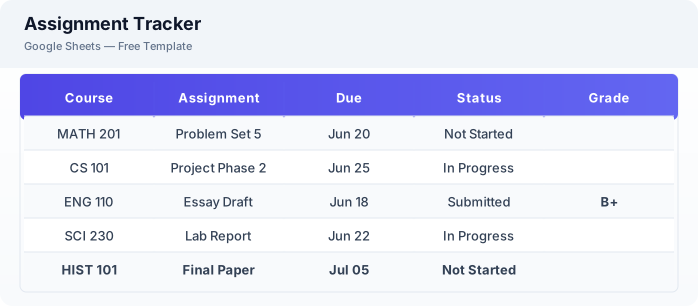
This assignment tracker template is a free Excel spreadsheet for managing homework, projects, and coursework. Track due dates, submission status, and grades across all your classes in one organized view.
Why Use a Google Sheets Assignment Tracker Template?
A Excel assignment tracker helps you never miss a deadline. With all assignments in one place, sorted by due date and course, you can prioritize effectively and reduce the stress of juggling multiple classes.
When Should You Use This Assignment Tracker Template?
Use this template at the start of each semester to log all known assignments and due dates. Update it weekly as new assignments come up. It works alongside the class schedule template for your weekly timetable.
What's Included
- ✓Course name
- ✓Assignment name
- ✓Due date & time
- ✓Submission status
- ✓Grade received
- ✓Weight / points
- ✓Notes & resources
- ✓Completed date
How to Use This Template
Who This Template Is For
Available Formats
Excel (.xlsx) — Download the file and open it in Microsoft Excel, Apple Numbers, or any compatible spreadsheet application.
CSV — Download the comma-separated values file for use in data applications, databases, or legacy spreadsheet software.
Customization Tips
- 💡Color code by course to see at a glance which classes have upcoming work.
- 💡Sort by due date to always focus on the most urgent assignments first.
- 💡Create a separate tab for each semester or quarter to keep terms organized.
Use Cases
- Homework assignment tracking
- College coursework management
- Grade monitoring
Download or Copy
Frequently Asked Questions
Related Templates
Last updated: 2026-06-17