College 4-Year Plan Spreadsheet for Excel
Plan your entire college academic journey with this free Excel template. No signup required — download. Track courses, credits, requirements, and GPA across all four years.
Free
No signup
Excel, CSV
Education
2026-06-01
What Is This College 4-Year Plan Template?
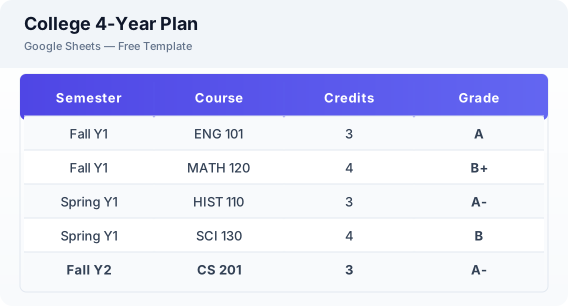
This college 4-year plan spreadsheet is a free Excel template for students and academic advisors who want to map out an entire degree program. It covers year-by-year course planning, semester scheduling, credit hour tracking, GPA calculation, and a degree requirement checklist for general education, major, and elective credits.
Why Use a Google Sheets College 4-Year Plan Template?
A Excel college plan helps you stay on track for graduation by visualizing your entire academic journey. You can experiment with different course schedules, track completed requirements, and share your plan with advisors. The template works on any device and can be exported to Excel or CSV for offline use.
When Should You Use This College 4-Year Plan Template?
Use this template when you are starting a new degree program, changing majors, or planning your remaining semesters to ensure timely graduation. It works for undergraduate and graduate students, community college transfers, and anyone who wants a clear roadmap through their academic requirements.
What's Included
- ✓Year-by-year course plan (4 years)
- ✓Semester 1 & 2 for each year
- ✓Course name & code
- ✓Credit hours
- ✓Prerequisites
- ✓Grade & GPA calculation
- ✓Degree requirement checklist
- ✓General education requirements
- ✓Major requirements
- ✓Elective credits
- ✓Notes & advisor comments
How to Use This Template
Who This Template Is For
Available Formats
Excel (.xlsx) — Download the file and open it in Microsoft Excel, Apple Numbers, or any compatible spreadsheet application.
CSV — Download the comma-separated values file for use in data applications, databases, or legacy spreadsheet software.
Customization Tips
- 💡Color code rows by requirement type: general education, major, minor, and elective for quick visual scanning.
- 💡Share the sheet with your academic advisor so they can review your plan and suggest adjustments.
- 💡Add future semesters proactively so you can experiment with different course sequences before registration opens.
Use Cases
- College degree planning
- Academic course scheduling
- Graduation requirement tracking
Download or Copy
Frequently Asked Questions
Related Templates
Last updated: 2026-06-01