Class Schedule Template for Excel
Organize your semester with this free Excel class schedule. Plan your weekly class times, room locations, and instructor info. Download Excel and CSV. No signup required.
Free
No signup
Excel, CSV
Education
2026-06-17
What Is This Class Schedule Template?
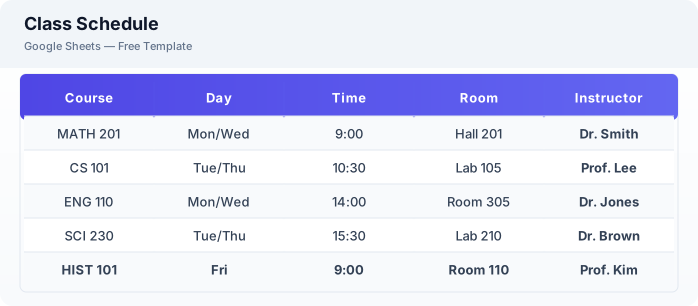
This class schedule template is a free Excel spreadsheet for organizing your semester timetable. It tracks course details, class times, locations, instructor information, and syllabus links in one convenient view.
Why Use a Google Sheets Class Schedule Template?
A class schedule template keeps your academic life organized. Instead of juggling multiple syllabus printouts or screenshots, you have all course information accessible from any device.
When Should You Use This Class Schedule Template?
Use this template at the start of each semester when you have registered for classes. It works alongside the assignment tracker for managing coursework and the college 4-year plan spreadsheet for long-term degree planning.
What's Included
- ✓Course name & code
- ✓Instructor & contact
- ✓Class days & times
- ✓Room location
- ✓Semester start & end
- ✓Office hours
- ✓Syllabus link
- ✓Notes
How to Use This Template
Who This Template Is For
Available Formats
Excel (.xlsx) — Download the file and open it in Microsoft Excel, Apple Numbers, or any compatible spreadsheet application.
CSV — Download the comma-separated values file for use in data applications, databases, or legacy spreadsheet software.
Customization Tips
- 💡Color code by department or subject to quickly identify different course types.
- 💡Add a link to the syllabus document in the syllabus column for quick access.
- 💡Print your weekly schedule as a reference for the first week of classes.
Use Cases
- Semester schedule planning
- College timetable organization
- Course registration tracking
Download or Copy
Frequently Asked Questions
Related Templates
Last updated: 2026-06-17