Lesson Plan Template for Excel
Plan engaging lessons with this free Excel lesson plan template. Organize objectives, activities, materials, and assessments for each class. Download Excel and CSV. No signup required.
Free
No signup
Excel, CSV
Education
2026-06-17
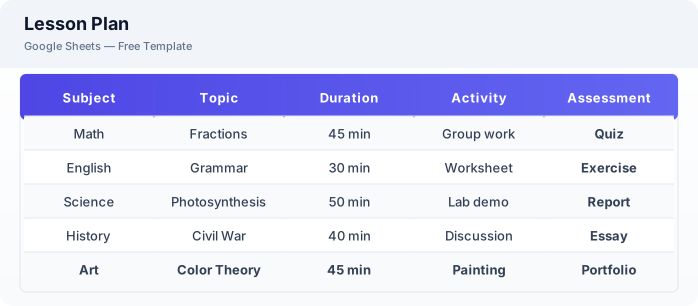
What Is This Lesson Plan Template?
This lesson plan template is a free Excel spreadsheet for teachers to plan, organize, and reflect on their lessons. It covers learning objectives, materials, activities, assessments, and post-lesson reflections to support effective teaching.
Why Use a Google Sheets Lesson Plan Template?
A Excel lesson plan keeps your teaching organized and accessible from any device. You can save and reuse effective lesson plans, collaborate with colleagues, and continuously improve your teaching through reflection notes.
When Should You Use This Lesson Plan Template?
Use this template when planning daily or weekly lessons for your classes. It works alongside the gradebook template for tracking student performance and the attendance tracker for monitoring participation.
What's Included
- ✓Lesson topic & subject
- ✓Learning objectives
- ✓Materials needed
- ✓Lesson outline (timeline)
- ✓Activities & instructions
- ✓Assessment method
- ✓Homework assignment
- ✓Reflection notes
How to Use This Template
Who This Template Is For
Available Formats
Excel (.xlsx) — Download the file and open it in Microsoft Excel, Apple Numbers, or any compatible spreadsheet application.
CSV — Download the comma-separated values file for use in data applications, databases, or legacy spreadsheet software.
Customization Tips
- 💡Create a bank of saved lesson plans in separate tabs that you can reuse and adapt.
- 💡Include backup activities for when lessons finish early.
- 💡Share weekly plans with teaching assistants or co-teachers for alignment.
Use Cases
- Classroom lesson planning
- Curriculum organization
- Substitute teacher preparation
Download or Copy
Frequently Asked Questions
Related Templates
Last updated: 2026-06-17