Goal Tracker Template for Excel
Set and achieve your goals with this free Excel goal tracker. Define SMART goals, track milestones, measure progress, and celebrate achievements. Download Excel and CSV. No signup required.
Free
No signup
Excel, CSV
Productivity
2026-06-17
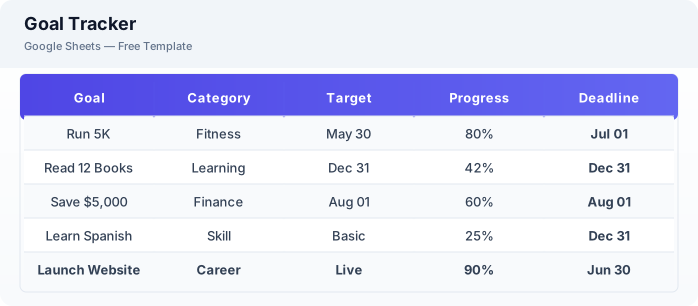
What Is This Goal Tracker Template?
This goal tracker template is a free Excel spreadsheet for setting, tracking, and achieving personal and professional goals. It uses the SMART goal framework, breaks goals into manageable milestones, and tracks weekly progress to keep you moving forward.
Why Use a Google Sheets Goal Tracker Template?
A goal tracker keeps your aspirations visible and accountable. Writing goals down dramatically increases the chance of achieving them. This template provides structure without the complexity of dedicated goal-setting apps.
When Should You Use This Goal Tracker Template?
Use this template at the start of a new month, quarter, or year to define your goals. Review it weekly to stay on track. It works alongside the habit tracker for daily consistency and the weekly planner for time management.
What's Included
- ✓Goal name & category
- ✓SMART criteria
- ✓Key milestones
- ✓Target date
- ✓Progress percentage
- ✓Weekly action steps
- ✓Obstacles & solutions
- ✓Completion date & celebration
How to Use This Template
Who This Template Is For
Available Formats
Excel (.xlsx) — Download the file and open it in Microsoft Excel, Apple Numbers, or any compatible spreadsheet application.
CSV — Download the comma-separated values file for use in data applications, databases, or legacy spreadsheet software.
Customization Tips
- 💡Review your goals weekly — update progress and adjust action steps as needed.
- 💡Keep visible goals — pin the sheet or set a recurring calendar reminder to review.
- 💡Share with an accountability partner who can check your progress and encourage you.
Use Cases
- Personal goal achievement
- Professional development tracking
- New Year resolution management
Download or Copy
Frequently Asked Questions
Related Templates
Last updated: 2026-06-17