Stock Watchlist Template for Excel
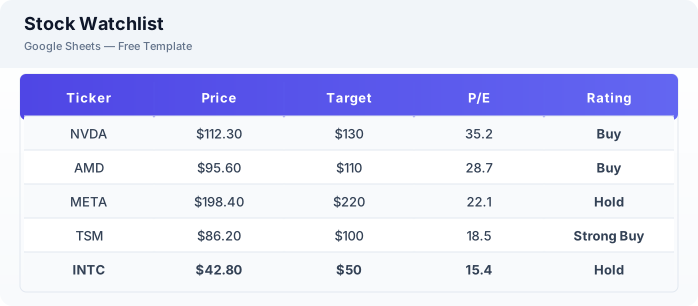
Monitor stocks on your radar with this free Excel stock watchlist template. Track price targets, P/E ratios, market cap, and price alerts. No signup required.
Free
No signup
Excel, CSV
Finance
2026-06-01
What Is This Stock Watchlist Template?
This stock watchlist template is a free Excel spreadsheet for tracking stocks you are monitoring. It includes fields for target prices, key ratios, market cap, and personal buy/sell ratings to organize your investment research.
Why Use a Google Sheets Stock Watchlist Template?
A Excel watchlist keeps all your stock research in one place. Unlike brokerage watchlists, you can add custom notes, catalysts, and your own analysis without platform limitations.
When Should You Use This Stock Watchlist Template?
Use this template when you are researching stocks and want to track potential investments alongside your existing portfolio. Pair it with the stock portfolio tracker for a complete investment management system.
What's Included
- ✓Ticker symbol
- ✓Company name
- ✓Current price
- ✓Target price
- ✓Buy/sell rating
- ✓P/E ratio
- ✓Market cap
- ✓52-week high / low
- ✓Price change %
- ✓Notes & catalysts
How to Use This Template
Who This Template Is For
Available Formats
Excel (.xlsx) — Download the file and open it in Microsoft Excel, Apple Numbers, or any compatible spreadsheet application.
CSV — Download the comma-separated values file for use in data applications, databases, or legacy spreadsheet software.
Customization Tips
- 💡Add a conditional formatting rule to highlight stocks that hit your target price (green) or drop below your stop-loss (red).
- 💡Use GOOGLEFINANCE to auto-populate current price, P/E ratio, and market cap.
- 💡Create a separate tab for each sector (Tech, Healthcare, Energy) to keep research organized.
Use Cases
- Stock watchlist monitoring
- Price target tracking
- Investment research organization
Download or Copy
Frequently Asked Questions
Related Templates
Last updated: 2026-06-01